In this article, we’ll outline the differences, explain which is better/worse, and provide details on how the technology works for each type of storage.

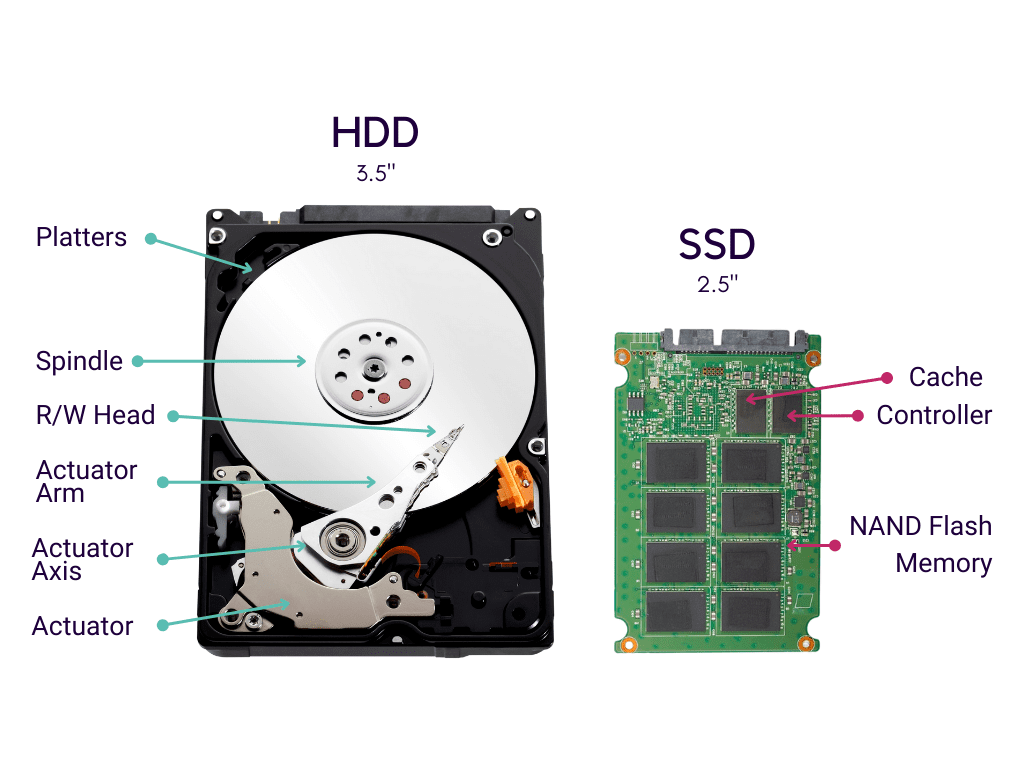
A traditional spinning hard disk drive (HDD) is an electromechanical data storage device that uses magnetic storage to store and retrieve digital information using one or more rapidly rotating, rigid disks coated with magnetic material. Hard disk drives have been around for over 50 years, with ever-increasing storage capacities and shrinking physical sizes. HDDs rely on spinning disks, or platters, to read and write data. They are mechanical hard drives, and therefore slower and less expensive than SSDs.
(Seagate BarraCuda 3.5-inch HDD)
SSD stands for Solid State Drive and is so-called because it has no moving parts (like a flash drive) and therefore doesn’t experience wear and tear, which is why it performs much better than a traditional hard drive, which has moving and spinning parts inside and is mechanical. SSDs are 5 times faster than regular HDDs. Although SSDs aren’t cheap, they’re about 1.5 times more expensive than HDDs.
(Kingston V300 2.5 inch)


(Samsung 970 EVO V-NAND M.2 1TB SSD)
NVMe (Non-Volatile Memory Express) is a new protocol for accessing high-speed storage media that offers many advantages over legacy protocols. This interface is designed to efficiently support the needs of enterprise and client systems that use PCI Express solid-state drives.
NVMe is actually only useful for transferring large files.
Lifespan: SSD vs. HDD
SSDs generally have a longer lifespan than HDDs. HDDs typically last around 3-5 years due to their mechanical components, while SSDs can last up to 10 years or more due to the lack of moving parts. Furthermore, SSDs don’t require defragmentation, further extending their lifespan.
For example, a business that chooses SSDs over HDDs for its office computers can expect fewer hardware failures and lower maintenance costs over time.
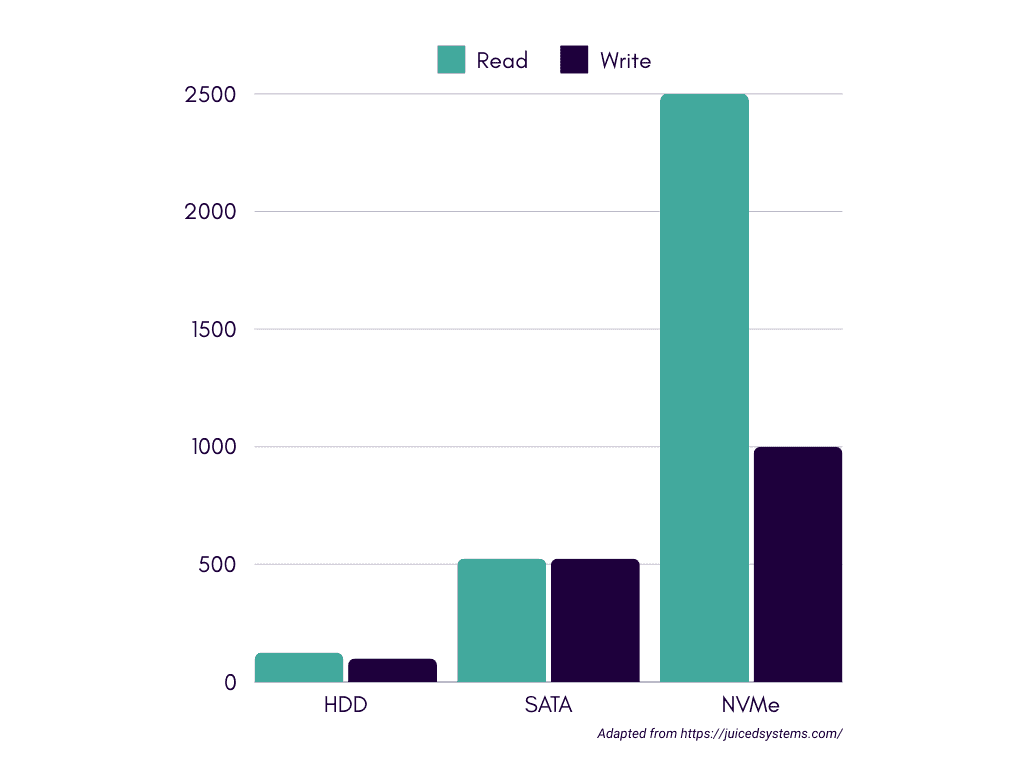
Kecepatan Baca dan Tulis: HDD vs. SATA SSD vs. NVMe
Read and write speeds for storage devices vary significantly between HDDs, SATA SSDs, and NVMe SSDs. HDDs can reach speeds of up to 200 IOPS, SATA SSDs can reach up to 100,000 IOPS, while NVMe SSDs can reach speeds much higher, often reaching 500,000 IOPS or more.
To illustrate, a data scientist using an NVMe SSD can run data-intensive simulations much faster than using an HDD or SATA SSD, thereby increasing productivity.
So, is your computer running slow? Upgrading to an SSD could be the solution. Choosing the right type of SSD can significantly impact your computer’s performance and reliability. SATA SSDs are affordable and widely compatible, while NVMe SSDs offer higher performance and lower latency.
Ultimately, the best SSD for your needs depends on your specific requirements and budget. By understanding the advantages and disadvantages of each type, you can make an informed decision and improve your computing experience.