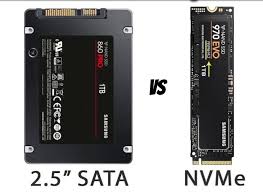
In the modern laptop era, speed and responsiveness are essential requirements, whether for work, study, gaming, or editing. That’s why SSDs are now the standard for laptop storage, replacing much slower HDDs. However, not all SSDs are created equal; two of the most commonly used types are SATA SSDs and NVMe SSDs. While they serve the same purpose as storage, they have significant differences in technology and performance.
To help you choose the right laptop when upgrading or buying a new one, here’s a complete explanation of the differences between the two.
What is a SATA SSD?
A SATA SSD is an SSD that uses the SATA (Serial ATA) interface, a technology previously used for hard drives. Despite improved performance compared to HDDs, SATA SSD speeds are still limited by SATA’s maximum speed limits.
SATA SSDs typically offer read-write speeds of around 500–600 MB/s, which is sufficient for daily tasks such as browsing, streaming, office work, college, and even light gaming. They can be M.2 SATA or 2.5-inch, making them suitable for older laptops that don’t yet support NVMe.
In other words, if your laptop still uses an HDD and wants a significant performance boost on a budget, a SATA SSD is more than sufficient.
What Is an NVMe SSD?
An NVMe (Non-Volatile Memory Express) SSD uses PCIe ports directly to the processor, which allows for significantly faster data transfer. NVMe read-write speeds can reach 2000 to 7000 MB/s, depending on the generation (PCIe 3.0 or 4.0).
NVMe SSDs are ideal for users who require high performance, such as video editors, graphic designers, software developers, heavy gamers, and workers who frequently open large applications simultaneously. In addition to high speed, system response is also noticeably faster, from booting Windows, opening applications, to transferring large files.
If your laptop supports NVMe, you’ll experience a significant performance boost compared to SATA.
Which is Better for Modern Laptops?
The answer depends on your laptop’s needs and hardware capabilities. Newer laptops typically support NVMe, and choosing NVMe is the ideal choice for maximum performance.
However, if you’re using an older laptop or are on a budget, a SATA SSD is still a very worthwhile upgrade. The difference compared to an HDD is still dramatic; the system is more responsive, applications open faster, and the user experience feels more modern. In short:
- If your laptop supports NVMe and you need high performance, choose NVMe.
- If your laptop is older or you want a budget-friendly upgrade, SATA is sufficient.
Conclusion
SATA and NVMe SSDs both offer speed improvements over HDDs, but NVMe offers significantly higher performance due to its more advanced technology. Choose an SSD based on your needs and laptop compatibility to ensure your upgrade is truly optimal.